
Testing batteries is something everyone faces sooner or later. Maybe your car won’t start, your remote is dead, or a flashlight suddenly stops working. Often, it’s not clear if the battery is the problem, or if something else is wrong.
Learning how to test a battery with a multimeter can save you time, money, and frustration. You don’t need to be an electrician or engineer. With a little guidance, anyone can use a multimeter to check if a battery is good, weak, or dead.
In this guide, you’ll discover how to test different types of batteries, which settings to use, and how to avoid common mistakes. You’ll also learn what the numbers mean, how to compare battery health, and when it’s time to replace a battery.
Whether you’re using a simple household battery, a car battery, or a rechargeable pack, this article explains everything in clear, simple language. You’ll find practical advice, real examples, and answers to questions most beginners have. By the end, you’ll feel confident using a multimeter to test any battery you own.
Why Test Batteries With A Multimeter?
A multimeter is a small tool that can measure voltage, current, and resistance. It’s one of the most useful devices for anyone dealing with electronics, cars, or home repairs. But why use it to test batteries?
First, guessing if a battery is “good” by looks or feel almost never works. Sometimes a battery that looks fine can be nearly dead. Other times, a battery that’s old still has plenty of life. Using a multimeter gives you real data so you can make better choices. This can help you:
- Avoid throwing away batteries that still work.
- Identify weak batteries before they cause problems.
- Save money by replacing only what you need.
- Diagnose problems with devices that use batteries.
Many beginners are surprised to learn that even new batteries can sometimes be weak, especially if stored for a long time. Testing with a multimeter is the only way to know for sure.
What You Need To Test A Battery
Before you begin, gather these items:
- Digital multimeter (or analog multimeter): A digital model is easier to read, especially for beginners.
- Battery or batteries: AA, AAA, 9V, car battery, or any other type you want to test.
- A clean, dry work area: Avoid wet or dirty surfaces.
- Pen and paper (optional): For writing down your results.
Most people use a digital multimeter because it shows exact numbers and is less likely to confuse you with needle readings. If you use an analog one, the steps are similar, but the display is different.
Understanding Battery Basics
Batteries come in many shapes and sizes. To test them, you need to know a few basics.
Main Battery Types
- Alkaline: Common in AA, AAA, C, D, and 9V batteries for remotes and toys.
- Lithium: Used in cameras, some AA/AAA, and coin cell batteries.
- Lead-acid: Found in car batteries, UPS backups.
- Nickel-cadmium (NiCd) / Nickel-metal hydride (NiMH): Rechargeable batteries for tools, cameras.
- Lithium-ion (Li-ion): Rechargeable batteries for laptops, phones, and power banks.
Each type has a nominal voltage (the voltage when fully charged):
- AA/AAA/C/D (alkaline): 1.5V
- AA/AAA (NiMH/NiCd): 1.2V
- 9V: 9V
- Car battery (lead-acid): 12.6V (fully charged)
Knowing the expected voltage helps you understand your test results.
What Voltage Means
Voltage is like water pressure in a pipe. It shows how much energy the battery can deliver. A new AA battery should give close to 1.5V. As it gets used, the voltage drops. When it falls below a certain point (often around 1.0V for alkaline), the battery is considered dead.
Pro tip: A battery might still show a “good” voltage when not in use, but drop quickly under load. This is called “surface charge.” For most home testing, checking the open voltage is enough.
How A Multimeter Works For Battery Testing
A multimeter has two probes: one red (positive) and one black (negative). When you touch these to the battery’s ends, the multimeter shows the battery’s voltage. You don’t need to take the battery apart or damage it.
The basic steps are:
- Set the multimeter to the right voltage range.
- Touch the red probe to the battery’s positive (+) terminal.
- Touch the black probe to the negative (-) terminal.
- Read the number on the display.
With this simple method, you can test almost any battery.
How To Test A Small Battery (aa, Aaa, C, D, 9v)
Let’s start with the batteries you use every day. These steps cover testing common household batteries.
Step 1: Set Up Your Multimeter
- Turn the multimeter on.
- Set the dial to DC voltage (V with a straight line). Batteries use DC (direct current).
- Choose a range higher than the battery’s voltage. For AA/AAA (1.5V), set to 2V or 20V. For 9V, set to 20V.
Step 2: Identify Battery Terminals
- The positive (+) end is usually flat with a bump.
- The negative (-) end is flat or has a wider surface.
Step 3: Connect The Probes
- Hold the red probe on the battery’s positive end.
- Hold the black probe on the negative end.
- Make sure your fingers don’t touch both probes at the same time.
Step 4: Read The Display
- The number that appears is the battery voltage.
- Compare it to the expected value (see the table below).
Step 5: Decide If The Battery Is Good
Here’s a quick reference for common battery types:
| Battery Type | Nominal Voltage | Good (V) | Replace (V) |
|---|---|---|---|
| AA/AAA/C/D (alkaline) | 1.5V | 1.3–1.6V | <1.1V |
| AA/AAA (NiMH/NiCd) | 1.2V | 1.2–1.4V | <1.0V |
| 9V (alkaline) | 9V | 8.5–9.5V | <7.5V |
Example: If your AA battery reads 1.48V, it’s good. If it reads 1.0V, it’s weak. If it’s below 0.9V, it’s dead.
Non-obvious tip: Many devices will stop working before the battery is “dead” by voltage. Some remotes need at least 1.2V to work well.
How To Test A Car Battery
A car battery is more powerful and uses 12V. It’s important for starting your car and running electronics. Testing it can help you avoid being stranded.
Safety First
- Wear gloves and eye protection if possible.
- Do not touch both terminals with your hands or metal tools.
- Work in a ventilated area.
Step-by-step Guide
- Turn off the car and all electronics.
- Set your multimeter to DC voltage, 20V range.
- Locate the battery terminals. The positive is marked + or red; the negative is – or black.
- Place the red probe on the positive terminal.
- Place the black probe on the negative terminal.
- Read the voltage.
What The Numbers Mean
| Voltage | Status |
|---|---|
| 12.6V or above | Fully charged |
| 12.4–12.5V | 75% charged |
| 12.2–12.3V | 50% charged |
| 12.0V | 25% charged |
| 11.9V or below | Discharged/replace |
Tip: If your battery shows less than 12.4V, it may not start your car reliably, especially in cold weather.
Non-obvious insight: Batteries can sometimes show full voltage with no load but still fail to start a car. This is due to low cold cranking amps (CCA), which you can’t measure with a basic multimeter.

How To Test Rechargeable Batteries
Rechargeable batteries behave differently from regular ones. They can lose capacity over time even if the voltage seems fine.
Testing Steps
- Set the multimeter to DC voltage, pick a range above the battery’s voltage.
- Connect the probes: Red to positive, black to negative.
- Read the voltage.
For NiMH/NiCd AA or AAA, a reading above 1.2V is good. Below 1.0V means it’s time to recharge or replace.
Lithium-ion batteries (like in laptops or power tools) have a nominal voltage of 3.6–3.7V per cell. If the voltage drops below 3.0V, they’re usually considered empty and should be charged soon to avoid damage.
Practical note: Some rechargeable batteries “self-discharge” when not used for a long time. If you test a battery that has been sitting for months, the voltage may be low even if it’s not damaged.
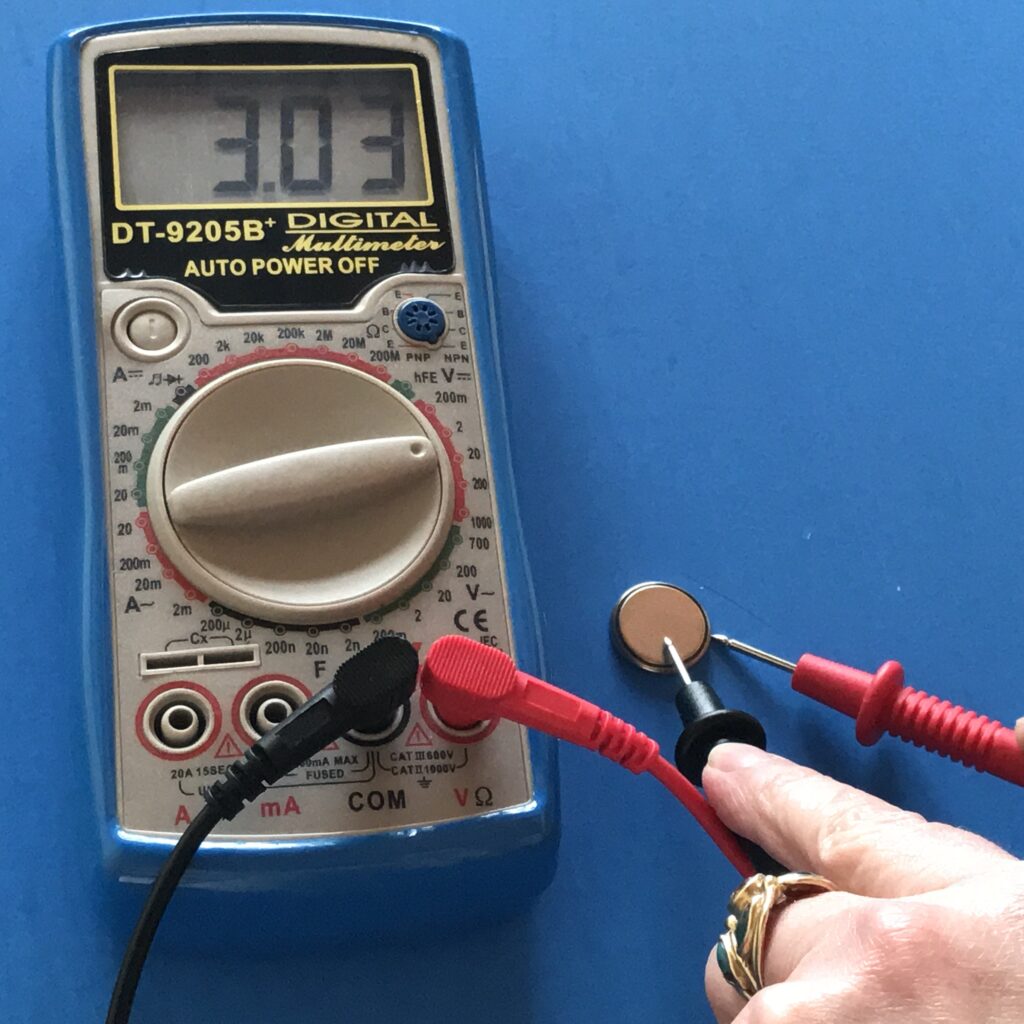
How To Test Coin Cell Batteries
Coin cells (like CR2032) are common in watches, calculators, and car remotes.
- Set the multimeter to 2V or 20V DC.
- Place the red probe on the flat, larger side (positive).
- Place the black probe on the smaller edge (negative).
- A reading above 3.0V means the battery is good.
- If below 2.8V, consider replacing.
Example: If your CR2032 reads 2.6V, it will probably not work reliably in most devices.
How To Test A Battery Under Load
Testing a battery’s voltage without a load is fine for most uses, but sometimes a battery shows good voltage when not in use but drops quickly when used.
Why Test Under Load?
Some batteries have “surface charge” that disappears as soon as a device tries to draw power. Testing under load tells you if the battery is really strong.
How To Do It
- Use a small resistor or the device itself as a load.
- Hold the probes on the battery terminals while the battery is powering something (like a flashlight or a small bulb).
- Read the voltage again.
- If the voltage drops sharply under load, the battery is weak.
Non-obvious tip: Most beginners skip this step, but it’s the best way to check if a battery can still power real devices.
Common Mistakes When Testing Batteries
Testing batteries is simple, but many people still make mistakes. Avoid these for the best results:
- Wrong setting: Choosing AC instead of DC voltage. Batteries are DC.
- Testing in the device: Some devices can affect the reading. Remove the battery if possible.
- Touching both probes with fingers: Can give incorrect readings.
- Reverse probes: The multimeter will show a negative sign, but the value is still correct.
- Dirty terminals: Dirt or corrosion can cause bad contact and wrong readings. Clean terminals if needed.
- Testing too soon after charging: Wait a few minutes after charging for the voltage to stabilize.
Pro tip: Always double-check your multimeter’s range and settings before testing.
What Your Results Mean (interpreting Readings)
Understanding the numbers is crucial. Here’s how to interpret common results:
- Reading is at or above nominal voltage: Battery is strong and ready to use.
- Reading is slightly below nominal (5–10%): Battery is weak but may work in low-drain devices.
- Reading is much below nominal: Battery is dead, replace or recharge.
- Reading is zero or negative: Battery is installed backward, dead, or there is a poor connection.
If you test several batteries, write down the results and compare them. You’ll quickly learn what “good” and “bad” look like for each type.
Comparing Battery Health
If you have several batteries of the same type (for example, a pack of AA), you can use your multimeter to find the strongest ones. Line up the batteries and test each one, writing down the voltage.
| Battery | Voltage | Status |
|---|---|---|
| AA #1 | 1.52V | Strong |
| AA #2 | 1.35V | Weak |
| AA #3 | 1.09V | Replace |
Use the highest-voltage batteries in devices that need more power (cameras, toys) and weaker ones in things like clocks or remote controls.
Non-obvious insight: Mixing new and old batteries in one device can cause leaks or poor performance. Always try to use batteries of similar voltage together.
Tips For Accurate Battery Testing
Getting good results is not only about following steps. Here are tips to make your testing more reliable:
- Test at room temperature: Cold batteries may show lower voltage.
- Test after resting: Wait 30 minutes after charging or heavy use.
- Check both terminals: Sometimes one end is corroded.
- Write down results: Helps spot patterns or problems over time.
- Replace in sets: For devices using multiple batteries, replace all at once for best results.
Pro tip: If in doubt, retest after a few days to see if the voltage drops quickly. This can show if a battery is self-discharging (a sign of internal damage).
When To Replace A Battery
A battery should be replaced when:
- The voltage is below the “replace” value for its type.
- It can’t power a device even though the voltage is close to normal.
- The battery leaks, is swollen, or smells strange.
- The voltage drops very quickly under load.
For rechargeable batteries, if capacity drops much lower than new (for example, runs your device half as long), it’s time to recycle it.
Environmental note: Never throw batteries in the regular trash. Take them to a recycling center or battery drop-off.

Advanced Battery Testing (for Curious Users)
While a basic voltage test is enough for most people, some want to go further.
Capacity Testing
You can measure a battery’s capacity (how much energy it holds) using a battery tester or specialized charger. This is more complex and not needed for most users.
Internal Resistance
Some advanced multimeters measure internal resistance, which shows battery health more deeply. High resistance means the battery can’t deliver power well.
Note: These advanced tests are not needed for simple home use but can help diagnose strange problems.
Real-world Examples
Let’s see how this works in daily life:
- Your TV remote is dead: You test the AA batteries. One reads 1.48V, the other 0.95V. Replace only the weak one.
- Car won’t start: Your car battery reads 11.7V. That’s too low. Try charging or replacing.
- Old flashlight: The D cell batteries read 1.15V. The light is dim, so new batteries will make it bright again.
- Laptop battery: A Li-ion cell reads 2.9V. That’s below safe level, so recharge immediately.
Testing batteries helps you solve problems faster and avoid wasting money.
Choosing The Right Multimeter
If you’re buying a multimeter, here’s what to look for:
- Digital display: Easier to read numbers.
- Auto-ranging: Automatically picks the best range, reducing errors.
- Clear labels: Look for a “V” with a straight line for DC voltage.
- Sturdy probes: Flexible and sharp tips work best.
- Accuracy: Most modern meters are accurate enough for battery testing.
Non-obvious tip: Even a cheap digital multimeter (under $20) is good enough for most battery tests.
For more details on how a multimeter works, you can visit this Wikipedia page on multimeters.
Frequently Asked Questions
What Does It Mean If My Multimeter Shows A Negative Voltage?
This usually means the probes are reversed: red is on negative, black is on positive. The battery is not reversed—just swap the probes, and the reading will be positive. The value is still correct, just the sign is negative.
Can I Test A Battery Without Removing It From The Device?
Yes, but it’s less accurate. Other parts in the device can affect the voltage reading. For the best results, remove the battery and test it alone.
Why Does My Battery Show Good Voltage But My Device Doesn’t Work?
Some batteries can’t deliver enough current even if the voltage seems fine. This is common with old or damaged batteries. Try testing the battery under load (while the device is on), or just replace the battery if unsure.
How Long Do Batteries Usually Last?
It depends on the type:
- Alkaline AA: 2–7 years shelf life, a few months to years in devices.
- Car battery: 3–5 years in normal use.
- Rechargeables: 500–1000 charge cycles.
Heat, humidity, and how much you use them all affect battery life.
Is It Safe To Test A Leaking Or Swollen Battery?
No. If a battery is leaking, swollen, or smells bad, do not test it. Dispose of it safely at a recycling center. Handling damaged batteries can be dangerous.
Testing batteries with a multimeter is a smart skill that saves time and money. With a little practice, you’ll quickly tell the difference between a good, weak, or dead battery. Always test safely, compare results, and don’t be afraid to replace old batteries.
This simple tool can help you keep all your devices running smoothly and avoid unexpected surprises.