
Opening your PlayStation 5 (PS5) to clean or replace the fan can feel challenging, especially if you are doing it for the first time. Many users worry about damaging the console, losing warranty, or using the wrong tools. The truth is, using the correct screwdriver is not just important—it’s critical. It protects your PS5 from scratches, stripped screws, and other damage that can be expensive to fix. This guide will answer the question: what screwdriver do you need to open the PS5 fan? It will also give you step-by-step insights, tool comparisons, and practical advice to help you do the job confidently and safely.
You’ll discover the five most important items for this process, why they matter, and what happens if you choose the wrong tool. By the end, you’ll be ready to open your PS5 fan area without guesswork or unnecessary risk.
Why The Right Screwdriver Matters For Your Ps5
The PS5 is not just a gaming console—it’s a piece of advanced technology with delicate parts. The fan is essential for keeping your PS5 cool and running smoothly. Dust buildup or a malfunctioning fan can lead to overheating, game crashes, or even hardware failure.
Opening the console with the wrong screwdriver can:
- Strip the screw heads, making them almost impossible to remove later
- Scratch or crack the casing, affecting the look and resale value
- Void your warranty if there are clear marks of tampering
- Lead to internal damage from misplaced force
Many PS5 owners make the mistake of using a regular Phillips screwdriver. While it might seem to fit, it can damage the unique screws Sony uses for the fan and casing. Knowing the exact screwdriver type helps you avoid these problems.
The 5 Essential Tools To Open The Ps5 Fan
To safely and efficiently access the PS5 fan, you need five key items. Each tool plays a role in ensuring a smooth process without causing harm to your console.
- Phillips #1 Screwdriver
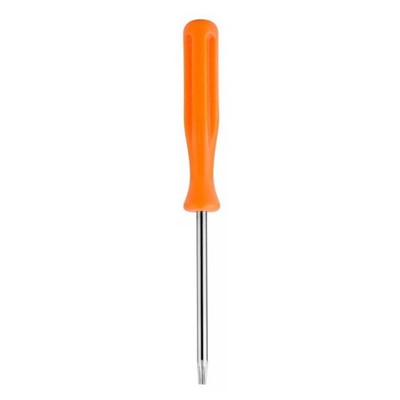
- T8 Torx Security Screwdriver
- Plastic Pry Tool
- Tweezers (Antistatic)
- Soft, Clean Cloth
Let’s look at each one in detail.
1. Phillips 1 Screwdriver
The Phillips #1 screwdriver is one of the most common tools for electronics, but not all Phillips screwdrivers are the same. The “#1” refers to the size, which fits the standard screws Sony uses inside the PS5, especially for fan mounting and internal brackets.
Why This Size?
The PS5 uses screws that are smaller and more delicate than those in furniture or other hardware. A #1 size matches the screw head closely, reducing the risk of stripping. Using a larger or smaller size can round off the cross pattern, making removal difficult or even impossible.
Features To Look For
- Magnetic tip: Prevents screws from falling into the console
- Precision grip: Gives you better control
- Non-slip handle: Offers comfort during delicate work
Mistakes To Avoid
A common beginner error is using a Phillips #2 or #0. These might “fit,” but they damage the screw heads over time. If you notice the screwdriver slipping or “cam out,” you have the wrong size.
2. T8 Torx Security Screwdriver
Sony also uses Torx security screws (sometimes called “star” screws) on the PS5’s fan area. The T8 size is the most reliable match for the fan screws.
What Is A Torx Security Screw?
A Torx security screw has a six-pointed star-shaped pattern with a tiny pin in the center. This pin prevents regular Torx drivers from working, which is why you need the “security” version (sometimes labeled as T8H).
Why T8?
The T8 size fits the PS5’s fan screws precisely. Using a T6 or T10 will either not fit or will strip the screw. The security hole in the center is essential—without it, you cannot access the screw at all.
Features To Look For
- Hollow tip: To fit the security pin
- Hardened steel: Prevents bending or breakage
- Short shaft: For better control in tight spaces
Non-obvious Insight
Many online toolkits labeled for “electronics” do not include the security version. Always check for the hole in the tip before purchase.
3. Plastic Pry Tool
The PS5’s casing is clipped together with tight plastic tabs. Using a metal tool can scratch or permanently mark the plastic, which is why a plastic pry tool is necessary.
Why Use Plastic?
Plastic is soft enough to avoid damaging the delicate white and black panels of the PS5. It slides between the seams and helps pop open the panels without leaving marks.
Features To Look For
- Thin, flat edge: Slides under tight gaps
- Flexible: Bends without snapping
- Wide surface: Distributes pressure to avoid cracks
Common Mistake
Some users use old credit cards or guitar picks. While these can work in a pinch, they are not designed for prying and may break or bend too much. A real pry tool is inexpensive and much safer for your console.
4. Tweezers (antistatic)
When working inside the PS5, especially near the fan and its screws, small parts can fall into hard-to-reach areas. Antistatic tweezers help you pick up and position screws or remove dust without using your fingers.
Why Antistatic?
Electronics can be damaged by static discharge, especially if you live in a dry climate. Antistatic tweezers prevent electricity from passing from your hand to the circuit board or fan.
Features To Look For
- Fine tip: For precise control
- ESD safe: Labeled as safe for electronics
- Comfortable grip: Prevents hand fatigue
Pro Tip
Always touch a metal surface before starting to discharge any static from your body.
5. Soft, Clean Cloth
Keeping your workspace and the PS5 itself clean is crucial. A soft, clean cloth protects the console from scratches while you work and helps wipe away dust from the fan area.
Why Not Paper Towels?
Paper towels can leave lint or scratch the surface. Microfiber or lint-free cloths are best.
How To Use
- Lay the cloth on your work surface before opening the PS5
- Use another cloth to gently wipe away dust from the fan and vents
Non-obvious Insight
Never use liquid cleaners on the PS5 fan or internal parts. Moisture can cause short circuits.
Step-by-step Guide: Opening The Ps5 Fan
Having the right tools is only part of the process. Here’s how to use them safely and efficiently.
1. Prepare Your Workspace
- Turn off your PS5 completely and unplug it from all cables.
- Place your PS5 on a flat, stable surface covered with your soft, clean cloth.
- Make sure you have all tools within reach.
2. Remove The Ps5 Faceplates
- Use the plastic pry tool to gently pop off the bottom right corner of the white faceplate.
- Slide the faceplate down and away from the console.
- Repeat on the opposite side if necessary.
3. Locate The Fan Cover Screws
- The fan is visible once the faceplate is removed.
- Identify the screws holding the fan cover. These will be either Phillips or Torx security screws, depending on your PS5 model.
4. Remove The Screws
- Use the Phillips #1 screwdriver for cross-shaped screws.
- Use the T8 Torx security screwdriver for star-shaped screws.
- Turn screws slowly and keep them in a safe place (a small bowl or magnetic tray works well).
5. Lift The Fan Cover
- Gently lift the fan cover. If it doesn’t come off easily, double-check for any hidden screws.
- Do not force the cover—check all edges with the plastic pry tool if needed.
6. Clean Or Replace The Fan
- Use antistatic tweezers to remove any visible dust or debris.
- Gently wipe the fan blades and surrounding area with a soft, clean cloth.
7. Reassemble The Console
- Replace the fan cover and reinsert all screws.
- Snap the faceplates back into place, ensuring all clips are secure.
- Plug in your PS5 and test for normal operation.
Comparing The 5 Tools: What Makes Each One Unique?
To help you see the differences at a glance, here’s a comparison of the five essential tools:
| Tool | Main Use | Key Feature | Why It Matters |
|---|---|---|---|
| Phillips #1 Screwdriver | Removing Phillips screws | Magnetic tip | Prevents lost screws and stripped heads |
| T8 Torx Security Screwdriver | Removing Torx security screws | Hollow tip for security pin | Fits Sony’s unique fan screws |
| Plastic Pry Tool | Popping open case panels | Flexible, non-marring | Prevents scratches and cracks |
| Antistatic Tweezers | Handling small parts | ESD safe coating | Protects against static discharge |
| Soft Cloth | Protecting and cleaning | Lint-free material | Prevents scratches, keeps dust away |
How To Identify The Screw Types On Your Ps5
Not all PS5 models use exactly the same screw type in every location. Here’s how you can quickly identify what you need:
- Phillips screws: Look for a “+” cross shape.
- Torx security screws: Look for a six-pointed star with a dot in the center.
If you’re unsure, shine a flashlight on the screw head. A magnifying glass can also help confirm the shape.
Why You Should Avoid Universal Or Cheap Toolkits
Many toolkits sold online claim to be “universal” for all electronics. These kits often have poor quality bits that don’t fit well and can break easily. Cheap tools can:
- Strip screws
- Snap under pressure
- Damage the console’s plastic casing
It’s better to buy a quality screwdriver set even if it costs a little more. Quality tools last longer and protect your PS5.

Comparing Phillips Vs Torx Security For Ps5
Some users are unsure whether to use Phillips or Torx. Here’s a quick comparison for PS5 fan screws:
| Screw Type | Shape | Location on PS5 | Best Tool |
|---|---|---|---|
| Phillips | “+” Cross | Fan brackets, some internal mounts | Phillips #1 |
| Torx Security | “Star” with center pin | Fan cover, some exterior points | T8 Torx Security |
Where To Buy The Right Screwdrivers
The safest places to buy quality PS5 screwdrivers are:
- Electronics stores: Offer branded toolkits with warranty
- Online retailers: Search for “T8 Torx Security screwdriver” and “Phillips #1 precision screwdriver”
- Hardware stores: Ask for precision electronics tools, not regular home screwdrivers
Check for reviews and photos before buying. If you see terms like “security” or “ESD safe,” that’s a good sign.

Risks Of Using The Wrong Screwdriver
Some risks are obvious, but others are not. Here’s what can happen if you pick the wrong tool:
- Stripped screws: Impossible to remove without drilling, which can destroy the case
- Broken plastic tabs: Panels won’t stay on tightly
- Internal damage: Metal fragments or scratches inside the console
- Warranty issues: Sony may refuse repairs if they see tool damage
Even if you manage to open the fan area, putting it back together with damaged screws or panels can leave your PS5 vulnerable to dust and overheating.
How Often Should You Open The Ps5 Fan?
Regular cleaning is important, but opening the PS5 too often also has risks. Most users only need to open the fan area every 6-12 months, depending on:
- Dusty environments: If you live in a place with lots of dust, clean more often.
- Pet hair: Pet owners may need to clean every 3-6 months.
- Cooling issues: If you hear loud fan noise or the PS5 feels hot, check sooner.
Cleaning more often than needed increases the chance of wear on the screw holes and plastic tabs.
Tips For Safe Ps5 Fan Cleaning
- Never use a vacuum cleaner directly on the fan—static can damage the electronics.
- Do not use compressed air inside the console. It can push dust further into the system.
- Always ground yourself by touching metal before handling internal parts.
- Keep screws organized. Use a labeled tray if possible.
- Double-check your tool. If it doesn’t fit perfectly, don’t force it.
Real-world Example: What Happens With The Wrong Tool
A user on a popular gaming forum tried to open their PS5 with a Phillips #2 screwdriver. The screws stripped, and the faceplate cracked at the corner. In the end, they had to pay for a replacement shell and professional repair.
This is a common story—using the exact recommended screwdriver would have prevented the damage.
The Impact On Ps5 Warranty
Sony’s warranty policy is strict. If there is visible tampering, scratched screws, or broken clips, they may refuse to repair or replace your console—even for unrelated issues. Always use tools that fit perfectly and keep all screws in good condition.
For more information on Sony’s warranty, see the official PlayStation Warranty page.
Common Myths About Opening The Ps5 Fan
- “Any small screwdriver will work.” False. Only the right size and type will avoid damage.
- “Plastic tools are not needed.” False. Metal tools can easily scratch or crack the PS5 shell.
- “I can use my hands to remove the faceplate.” Sometimes possible, but risky. Pry tools are much safer.
What To Do If A Screw Gets Stripped
If you accidentally strip a screw:
- Stop immediately. Do not force the tool.
- Try using a rubber band between the screwdriver and screw head for extra grip.
- If the screw is stuck, seek professional help rather than risk further damage.
How To Store Your Tools For Future Maintenance
Keep all your PS5 tools in a dedicated box or bag. Label each tool and keep them together. This will save time and prevent loss when you need to clean or repair your console again.
Frequently Asked Questions
What Screwdriver Do I Need To Open The Ps5 Fan?
You need a Phillips #1 screwdriver for regular screws and a T8 Torx security screwdriver for star-shaped screws with a security pin. Both are essential for different screw types found in the PS5 fan area.
Can I Use A Regular Phillips Screwdriver For My Ps5?
No. Regular Phillips screwdrivers are often too large or small. Only a Phillips #1 fits the PS5’s delicate screws without causing damage.
Is It Safe To Open The Ps5 Fan By Myself?
Yes, if you use the right tools and follow careful steps. Always unplug the console, ground yourself, and avoid using metal tools on plastic panels. If you are unsure, consider professional cleaning.
Where Can I Buy The Right Screwdriver For Ps5?
You can buy them from electronics stores or online retailers. Look for “T8 Torx Security” and “Phillips #1 precision” screwdrivers. Make sure they are labeled for electronics, not general hardware.
Will Opening My Ps5 Void The Warranty?
It can, if you damage the screws or internal clips. Always use the correct tools and handle parts gently. If your PS5 is under warranty, check Sony’s policy before opening the console.
Opening your PS5 fan is not as hard as it seems when you have the right information and tools. By choosing the correct screwdriver and following safe practices, you can clean or replace the fan without risk. Taking care of your PS5 now means better performance and a longer life for your console.